


IPTV Player: All Channel Live
3.37.00 Reviews
App Specs
- Version
- 1.1
- Updated On
- License
- Free
- Downloads
- 100,000+
- Developer
- Silveroot Softwares
- Categories
- Entertainment
- Platform
- Android
Screenshots

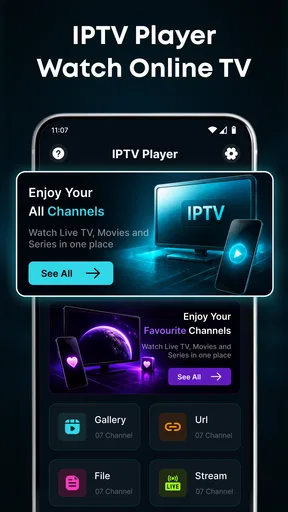
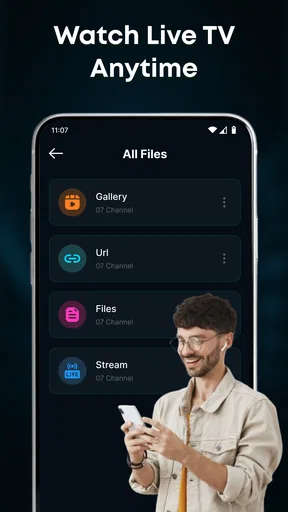
 Analysis by AppCompare
When I try an IPTV app, I care less about a long feature list than about whether it makes the path from my own channel source to a watchable picture feel straightforward. IPTV Player: All Channel Live is built around that practical job: it gives you a place to add IPTV content and browse the channels your source provides. It is an entertainment app from Silveroot Softwares, and it is free to try, which makes it an easy option to consider if you already have access to a legitimate IPTV playlist or service.
The important distinction is that this is a player, not a substitute for a TV provider. The app’s usefulness depends on what you bring to it: without a suitable source, there is no channel selection to browse. That arrangement suits viewers who want one app for their own IPTV content, but it may disappoint someone expecting a ready-made package of channels. I would decide whether I have a compatible source before judging the app itself.
What to expect when opening a channel
I’d use this section to set a realistic expectation before choosing a channel: the player is only one part of the route from your IPTV source to a picture. I’d begin with a familiar channel and a steady connection, then use what happens next to judge whether the source and device suit my usual viewing.
Speed depends on more than the player
The promise of smooth HD viewing is appealing, but live playback has several moving parts. The stream’s source, the quality of the connection, the device, and the channel itself can all affect how quickly a picture appears and whether it stays steady. I would not treat a smooth result on one channel as a guarantee that every channel in a playlist will behave the same way.
For a fair first test, I’d add my source and try a few channels with different viewing habits in mind: one I watch often, one I might use during a busy evening, and one that is less important to me. This helps separate a player issue from a source that is slow or unreliable. If a channel struggles while another plays normally, changing the source or checking the connection is a more useful next step than repeatedly reopening the app.
That distinction matters because an IPTV player does not create the broadcast. It presents content supplied through the user’s source. The app can make browsing and playback convenient, but it cannot repair a weak stream upstream. I’d approach “HD” as an intended viewing experience rather than a promise that every channel will arrive in high definition under every network condition.
Busy viewing and practical workarounds
A realistic use case is settling in to watch a live event while other people at home are using the same internet connection. If the picture begins to stall at that moment, I would first check whether other devices are consuming bandwidth and whether the same channel behaves better on a steadier connection. Live video is less forgiving than a downloaded film: a momentary interruption is noticeable immediately, and the stream may need time to resume.
Worth Reading Before You Choose

Flipboard Shows What News Apps Must Do Beyond the Feed

Switching to Android Auto Means Rethinking Your Driving Routine

Google Calendar Makes a Crowded Week Easier to Manage

Ludo King Makes the Most of the Minutes Between Plans

Baby Panda World Brings Quick Play to Modern Phones, but Its Game Library Feels Busy

ESPN’s Live Game View Makes Following Close Games Easier
One useful habit is to test the channels you actually plan to watch before an important match, news broadcast, or family viewing session. That avoids discovering at the last minute that a particular source is slow or unavailable. It also makes the app easier to assess: a short test on a quiet afternoon tells you whether your setup works before you rely on it at a crowded hour.
On a long playlist, browsing itself can be part of the experience. I’d keep the source focused on channels I use instead of treating a large list as automatically better. A smaller, relevant selection is easier to scan when I want to start watching quickly, and it reduces the chance that I spend more time looking through entries than watching. This is a practical organization choice rather than a claim that the app has a particular sorting or favorites tool.
Reliability is a shared responsibility
For IPTV, reliability is rarely just a matter of the app. A good player can still appear inconsistent if the supplied stream changes, the network drops, or a channel’s source is temporarily unavailable. When playback fails, I’d check another channel from the same source, then try again on a stable connection. If every channel fails, the source or network is a more likely place to investigate than a single channel.
The same approach helps avoid confusing a one-off interruption with a persistent problem. If a channel repeatedly fails while other content remains watchable, I would treat that channel as a source-specific issue. If playback is broadly unstable, I’d test the connection and restart the viewing session before deciding whether the app fits my routine. This simple troubleshooting order saves time and gives a clearer picture of where the fault may lie.
There is also a trust consideration: only add IPTV content from a provider or source you are entitled to use. The app’s role is to play user-added material, so the viewer remains responsible for choosing a legitimate source. Anyone looking for a bundled subscription or a curated library should compare services that explicitly provide those things rather than assuming a player includes them.
Device fit and everyday use
The app is listed for Android devices running version 7.0 or later, so it can be considered on a range of older and newer Android hardware that meets that requirement. Still, operating-system eligibility does not tell me how a particular device will handle live video. A phone with limited available memory, an older processor, or a busy background workload may feel less responsive than a newer device, especially when the network is also under strain.
If you plan to watch for a long stretch, I’d close demanding apps you are not using and make sure the device has a dependable connection. Those are sensible steps for live streaming generally, not special controls built into this player. On a phone, a small screen may also make browsing channel names less comfortable than watching on a larger display. The app may suit quick viewing and casual checks better than a living-room setup for someone who prioritizes a television-sized picture.
For a household that shares one phone or tablet, remember that the app’s channel lineup comes from the source added to it. That means another person’s experience may differ if they use a different playlist or provider. Before treating the app as a shared family TV hub, I’d check that the source itself has the channels everyone expects and that the device is comfortable for the way the household watches.
Where it sits among other viewing options
Compared with familiar streaming services, an IPTV player puts more responsibility on the viewer. Subscription apps usually present their own catalog and guide users through a managed library; this app is centered on browsing user-added live channels. That can be an advantage if you already have a preferred IPTV source and want a dedicated place to access it. It is less convenient if you want recommendations, on-demand shows, or a ready-to-watch channel package without setup.
Compared with watching through a provider’s own app, a separate player may appeal to someone who wants to bring their own content into a general-purpose viewing tool. The trade-off is that setup and stream quality depend heavily on the source you choose. I would favor a provider’s official app when it offers a reliable channel guide, account support, or a viewing experience that matters more than combining sources. I’d favor this player when the source is already in hand and straightforward channel access is the main goal.
The app has an average rating of 3.5 from around 140 ratings, with over 100,000 installs. Those figures suggest that it has attracted a real audience, while the mixed average is a reason to keep expectations measured rather than assume it will work perfectly with every source. Its current release is version 1.1, so I’d pay attention to how it performs with my own setup instead of relying on popularity alone.
Who is likely to be satisfied?
I’d recommend giving it a try if you already have a legitimate IPTV source, mainly watch live channels, and want a free Android player rather than another subscription catalog. It may also suit someone who is comfortable doing basic checks when a stream behaves poorly. The app is marked for Everyone, but that age label does not change the practical point: users still need to choose appropriate content and a trustworthy source.
I would skip it if I expect channels to appear automatically, want a guaranteed lineup, or need a polished, managed service with support for a provider account. It is also not the right solution for someone whose main priority is an extensive on-demand library. A conventional streaming service or the official app from a TV provider is likely a better fit in those cases, because the content and delivery are part of that service rather than something the viewer must bring.
My performance verdict
My overall view is cautiously positive. IPTV Player: All Channel Live has a clear purpose: let viewers add their own IPTV content and browse live channels in an Android app. Its strongest practical quality is that focused role, especially for someone who already knows which source they want to use. Its main limitation is just as clear: playback quality and channel availability are tied to that source, the network, and the device, so the app alone cannot guarantee a consistently smooth evening.
I’d start with a small, familiar set of channels, test them on the connection and device I plan to use, and expand only after playback feels dependable. That gives me a useful answer without mistaking a weak stream for a player defect or expecting the app to supply content. Silveroot Softwares’ free entertainment app is worth trying for source-ready viewers who want a straightforward live-TV player; for anyone who wants an all-in-one television service, a provider-backed alternative is the safer choice.
A low-pressure way to decide
If I were setting it up for a normal weekday, I’d first choose a short group of channels I actually expect to watch, then test one while browsing and another during a time when the household network is busier. That gives a more realistic sense of everyday speed than judging the app from a single successful opening. It also helps answer a practical question: does the source I already have make this player useful enough to keep using?
For someone who watches occasional live news or checks a particular channel while away from the main television, a phone can be a convenient place to use a personal IPTV source. For a long evening of shared viewing, I’d be more careful: check the picture on the intended device and connection beforehand, and consider whether everyone can comfortably navigate the channel list. If the source is difficult to browse or inconsistent, the convenience of having a player on hand may not outweigh the setup effort.
The key trade-off is control versus convenience. Bringing your own source can make the app a simple route to channels you already use, but it also means that source choice and troubleshooting stay with you. I’d choose it when that responsibility is acceptable and avoid it when I want a single provider to handle the lineup and viewing experience from end to end.
Pros
- Supports live TV playback through IPTV playlists.
- Lets you organize channels for easier browsing.
- Includes a search option to find channels quickly.
- Can be useful for managing multiple IPTV playlists.
- Provides a straightforward way to access live streams in one app.
Cons
- Does not provide TV channels or subscriptions itself.
- Stream quality depends on your playlist and internet connection.
- Some streams may be unavailable or stop working unexpectedly.
- Playlist setup may be confusing for first-time IPTV users.
- Channel availability and legality depend on the playlist provider.
FAQs for IPTV Player: All Channel Live
What is IPTV Player: All Channel Live, and what does it do?
IPTV Player: All Channel Live is designed to play television streams delivered over an internet connection, rather than through a traditional antenna or cable box. It functions as a player, so the channels and programs available depend on the playlists or streaming sources you add and whether those sources are working. Check the app’s current listing and setup instructions to confirm which formats and features are supported on your device.
Does IPTV Player: All Channel Live include free live TV channels?
Do not assume that downloading the app provides access to a complete package of free channels. IPTV players generally display streams supplied through a playlist or service, and availability can vary by provider, region, and time. Some sources may require a separate subscription, while others may be free. Before using any stream, verify its cost, reliability, and authorization, and avoid playlists or services that claim access to paid content without permission.
How do I add channels or a playlist to the app?
Getting started typically involves opening the player and supplying a supported playlist or stream source, such as a file or link provided by an IPTV service. The exact menu names and accepted formats can differ between app versions, so consult the app’s instructions or listing if an option is not obvious. Use only sources you trust, and never enter account details into an unfamiliar link or service.
Is IPTV Player: All Channel Live safe and legal to use?
A media player is not necessarily illegal simply because it plays IPTV streams, but the legality of the content depends on whether the stream provider has permission to distribute it in your location. Download the app from an official store where possible, review its requested permissions and privacy information, and use legitimate playlists or subscriptions. Be cautious with unofficial downloads, suspicious payment requests, and sources promising premium channels at no cost.
What should I check if a channel will not play or keeps buffering?
First, check that your internet connection is stable and that the playlist or stream address is current; IPTV sources can stop working or become unavailable without notice. Try another channel, restart the app, and update it if an update is offered. If playback problems affect only one stream, the issue may be with its provider rather than the player. Also consider data usage and your network’s capacity when streaming over mobile data.


